
Long post ahead
This one goes deep with experiments, failures, wins, and the full optimization trail. Grab a coffee ☕.
The impact
A screenshotting service doesn't have to be 1.75GB and take ~4 seconds per operation. Things like these bug me, and the folks I work with know it too lol!
Also, if you're wondering why we even need Chromium if it's just screenshots — it's not just screenshots.
Impact
The docker-browser service at Appwrite is straightforward: spin up a headless browser container, take screenshots or generate Lighthouse reports. Nothing complicated.
But the Docker image was ~1.75GB, and screenshots were taking around 4 seconds. Note that the delay was intentional for some websites. For a service that just launches Chromium and captures images, that seemed... heavy.
Over multiple optimization sessions, that 1.75GB image ended at 417MB - a 76% reduction. But the size wasn't the only win: startup dropped from 827ms to 313ms, memory usage went from 579MB to 255MB, and screenshots became 78% faster.
The journey
Here's how each stage progressed:
- Baseline: 1.75GB, ~4s per operation
- Stage 1: Base image & Playwright → ~1GB
- Stage 2: Alpine Chromium + cleanup → 888MB
- Stage 3: Bun + TS (stability improvements)
- Stage 4:
node_modulessurgery + UPX → 752MB - Stage 5: headless-shell + final cleanup → 498MB
- Stage 6: Layer squashing + aggressive optimization → 417MB 🎯
Stage 1 – Base image & Playwright
The original setup had two problems: a heavy node:22-slim image and pnpm playwright install --with-deps chromium, which downloads Playwright's bundled Chromium.
I switched to zenika/alpine-chrome:with-node, moved to using playwright-core and removed a bunch of unnecessary files to reduce image size:
RUN pnpm install --prod --frozen-lockfile && \
  pnpm prune --prod && \
  # remove unnecessary files to reduce image size
  find /app/node_modules -name "*.md" -delete && \
  find /app/node_modules -type d -name "test*" -exec rm -rf {} + 2>/dev/null || true && \
  find /app/node_modules -type d -name "doc*" -exec rm -rf {} + 2>/dev/null || true && \
  find /app/node_modules -name ".cache" -type d -exec rm -rf {} + 2>/dev/null || true && \
  # clean up caches
  rm -rf ~/.pnpm ~/.npm /tmp/* /var/cache/apk/*
Result: ~1.75GB → ~1GB

Then I forgot about it since this wasn't a priority. I was happy with slashing this much!
Stage 2 – Alpine Chromium + cleanup
I came back to it when I had the chance, removed zenika/alpine-chrome:with-node, switched to node:22.13.1-alpine3.20, and pulled in Chromium from Alpine to build it in the image. That wasn't the only thing I did; I added modclean as well. Something that Matej Bačo suggested I try! And that did help in some capacity! And as before, manually removed files like:
# remove unnecessary chromium files to save space
rm -rf /usr/lib/chromium/chrome_crashpad_handler \
  /usr/lib/chromium/chrome_200_percent.pak \
  /usr/lib/chromium/chrome_100_percent.pak \
  /usr/lib/chromium/xdg-mime \
  /usr/lib/chromium/xdg-settings \
  /usr/lib/chromium/chrome-sandbox
This worked just fine on local setup but as soon as this hit the CI, the first crash came in due to missing chrome_crashpad_handler. So I had to add it back!
Result: ~1GB → 888MB

Better, but still not great. Note that we eventually removed modclean as it only got a mere 16MB reduction.
Stage 3 – Bun + TS (stability improvements)
This was more of a quality patch that we wanted to get done so we could use Bun for improved performance and TypeScript safety. Something that just felt right in this process. Nothing much here that contributed to the size reduction. Remember the chrome_crashpad_handler-based crash I mentioned above? Thanks to the test suite, it was caught on CI. Both PRs were being worked in parallel so I was able to catch it and push the fixes to the parent branch above.
It didn't change the image size, but it made sure later optimizations wouldn't quietly break in production.
Result: No size change, but caught crashes early.
Stage 4 – node_modules surgery + UPX
This is where it gets more interesting.
Determined to slash some more size because it's a screenshot service, I built the image locally, started the container and scoured through the node_modules labyrinth. As odd as it sounds, it helped — big time.
This was the first iteration: https://github.com/appwrite/docker-browser/blob/32964261c1b5a1e747bb0b8277c04432b4bca6fa/src/utils/clean-modules.ts
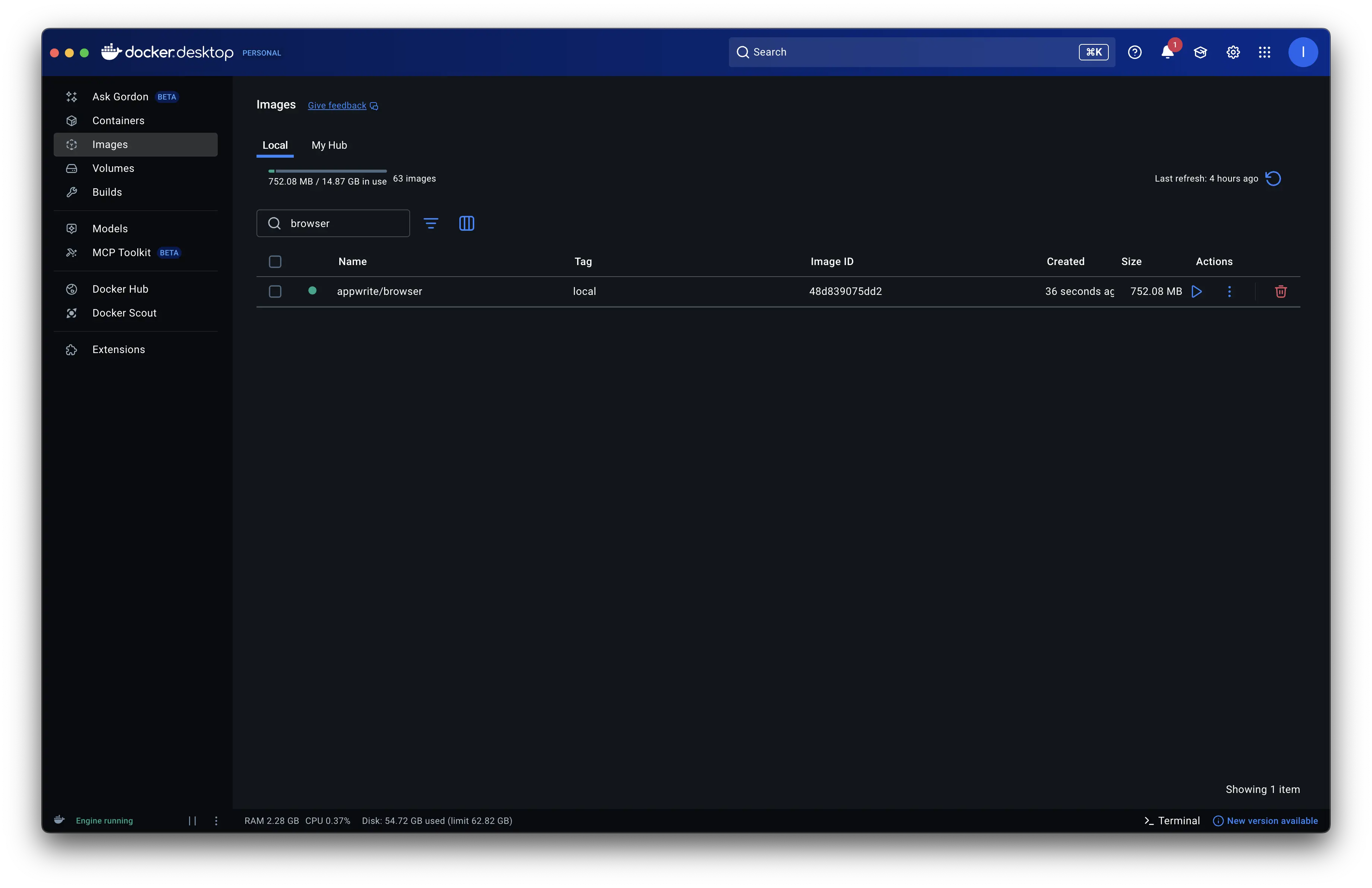
Result: 888MB → 752MB

Playing around a lot more with this, I found UPX and used it to compress chromium's binary. The result was a staggering change from 238MB to 60MB:
UPX looked great, but...
- On disk: 238MB → 60MB (amazing!)
- At runtime: idle memory jumped to ~1GB (~5x more)
- UPX did an amazing job compressing the binary, but at startup, the ENTIRE binary must be decompressed into RAM before execution. This means a 60MB compressed binary becomes 238MB in memory, PLUS the OS overhead, resulting in ~1GB idle memory.
The tradeoff wasn't worth it - saving disk space but consuming 5x more RAM made the container unusable for production. Back to the drawing board, but now at 752MB instead of 700MB.
Stage 5 – headless-shell + final cleanup
While researching how to get the smallest Chrome binary, I stumbled upon chromedp/headless-shell. Just reading the name hit me - "damn it, we should've always started with a headless version". But that's fine; the detour led to a lot of learning and this article.
chromedp/headless-shell is purpose-built for headless automation—no GUI libraries, no display servers, no X11 dependencies. It's well-maintained by the chromedp team and already used by thousands of projects.
With some more playing around with chromedp, debian, bun optimizations, node_modules removals, I got varying differences around 6xxMB. This had my mind so much into this that while away from the workspace, I made a fork of the repo, and triggered Copilot's agentic task to investigate.
Here's what actually worked:
Swapping to
chromedp/headless-shellv128 brought the image down from 752MB to 527MB, killed the 5× memory overhead, and took startup from 6/7 seconds to under a second.Switching to Bun's baseline binary shaved off another ~15MB, while also giving me a much smaller 30MB Bun binary compared to the usual ~90MB one.
Cleaning out redundant
node_modulesfiles (CHANGELOGs, LICENSEs, AUTHORS, etc.) - the cleanup went from a huge 171MB → 42MB.Merging multiple RUN commands into a single layer saved roughly 10–15MB, and some aggressive apt/cache cleanup added another 5–10MB of savings.
Not everything worked though - trying a native Debian + Chrome combo actually increased the image by ~77MB and broke due to missing ICU/V8 data files. Stripping Chrome binaries made things even worse, ballooning the image by 206MB because Docker had to include fallback layers.
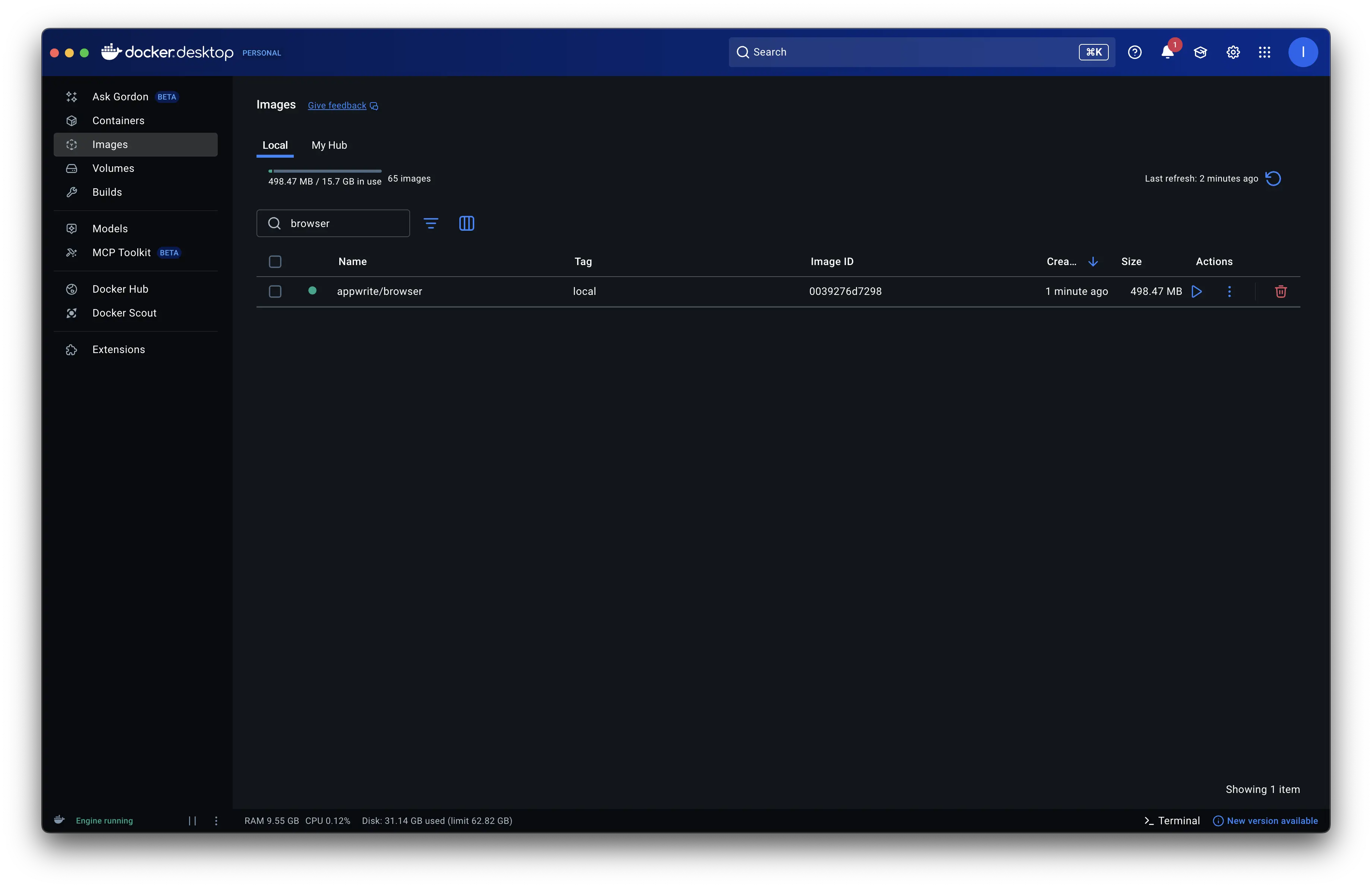
But the result landed cleanly: 752MB → 498MB, normal memory usage, and startup consistently under one second.
Stage 6 – Layer squashing + aggressive optimization → 417MB 🎯
After hitting 498MB, I wanted to push further. The breakthrough came from revisiting Docker's layer architecture.
The problem: When you remove files in a RUN command, Docker doesn't actually delete them from the image - it just marks them as deleted in a new layer. The base layer still contains those files, bloating the final image.
The solution: Layer squashing using FROM scratch:
FROM chromedp/headless-shell:143.0.7445.3 AS chromedp
RUN apt-get install ... && \
    # Remove unnecessary files
    rm -rf /usr/lib/aarch64-linux-gnu/gconv/* && \
    rm -rf /usr/lib/aarch64-linux-gnu/security/* && \
    rm -f /usr/bin/perl* && \
    # ... more removals

# Squash all layers into one
FROM scratch AS final
COPY --from=chromedp / /
This copies the cleaned filesystem (not the original with deletion markers), truly removing files.
I aggressively removed a lot of unused libraries, modules, timezone data, apt tools, docs, and other development cruft.
Result: 498MB → 417MB
But the real win wasn't just size - performance improved dramatically:
| Metric | Before | After | Improvement |
|---|---|---|---|
| Screenshot time | 3,951ms | 878ms | 78% faster |
| Startup time | 827ms | 313ms | 62% faster |
| Memory (active) | 579MB | 255MB | 56% less |
| Memory (idle) | 392MB | 172MB | 56% less |
| Docker Hub download | ~650MB | ~200MB | ~69% less |
The image is not just smaller - it's faster, leaner, and cheaper to deploy.
Takeaways
Pick headless bases from the start -
chromedp/headless-shellwas purpose-built for this. Starting with a full browser adds hundreds of MBs you might never use.Understand Docker's layer architecture - Deleting files in RUN commands doesn't reduce image size, it just marks them as deleted. Use
FROM scratch+COPYto truly squash layers.Beware of compression tricks - UPX's 75% compression looked great on disk, but the 5x memory overhead killed it. Always test runtime behavior.
Test in CI, always - The
chrome_crashpad_handlercrash would've been a production surprise without the test suite catching it because well, it worked on my machine 🤡.Treat
node_modulesas an optimization surface - 171MB → 42MB just from removing docs, tests, and unused locales.
Repository: github.com/appwrite/docker-browser
PRs: