
WebFontKit: Google Fonts
Any Google Font by name in SwiftUI - on iOS and macOS, nothing bundled.
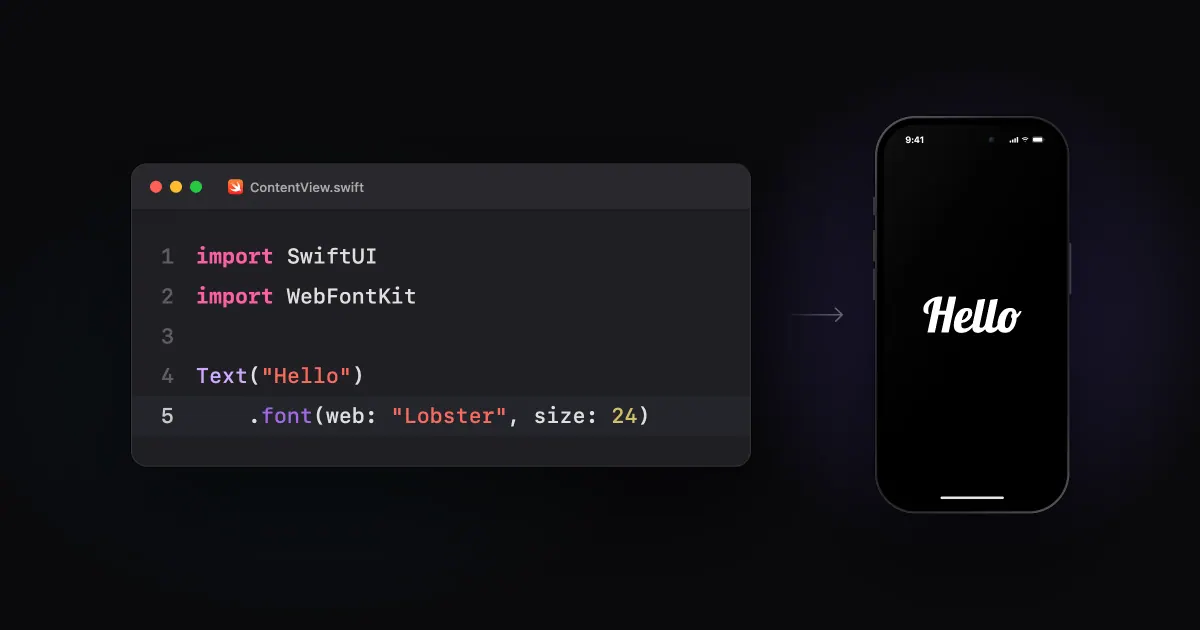
On the web, a Google Font is one <link> tag away. On Android,
Downloadable Fonts have been around
for years, Compose included. On iOS?
Even in SwiftUI, you download the .ttf, drag it into Xcode, list it in Info.plist, dig out its PostScript name, and
repeat for every weight you want. Then it ships inside your app, whether anyone ever picks it or not.
But Doesn't iOS already download fonts?
Sort of. Core Text can fetch extra fonts on demand, but only from Apple’s own catalogue of system fonts. Google Fonts aren’t in it.
That’s fine for one brand font. Not so much for a font picker, or themes users can change, or anything you’d want to update without shipping a new build. Nobody is bundling ~1,950 families - I once spent months squeezing just 29 into 749KB for Android.
What I actually wanted
Write the family name, get the font. Downloaded once, kept on disk, no app update to add one more.
So I stopped dragging .ttf files into Xcode. 😄
Enter WebFontKit
WebFontKit is a small Swift package for iOS and macOS that does exactly that:
Text("Hello").font(web: "Lobster", size: 24)That’s the whole API for most uses. The first time, it downloads Lobster from Google Fonts and stores it. After that it’s on disk and works offline.
The bits I didn’t want every app to rewrite:
- No blank text. The system font shows until Lobster is ready, then it swaps in.
- Dynamic Type. Sizes scale with the user’s text size, unless you ask for a
fixedSize. - One download per font. However many views ask for Lobster at once, there’s one request.
- Weights and italics.
.font(web: "Inter", size: 17, weight: .bold, italic: true)fetches just that face. - Know when it’s ready. Pass a closure and get
.loading,.loadedor.failed- handy for a spinner in a font picker.
Apple’s APIs do the drawing
WebFontKit never draws text itself. It registers the downloaded font with the system, so from then on it’s an ordinary
font for your app - Text, Font.custom, UILabel, attributed strings, all of it. Kerning, ligatures and Dynamic Type
behave exactly like they do with any font, because it is just a font now.
try await WebFonts.shared.load("Inter", styles: [.regular, .bold])
label.font = UIFont(name: "Inter", size: 17)
Widgets work the same way: a widget renders once, so load its fonts in the timeline provider before returning the entry. Point the app and widget at the same App Group folder and they share one download.
Fast first loads
A font’s first load has two network steps: ask Google’s CSS2 API where the file is, then download it. The asking turned out to be about half of it. So WebFontKit ships a tiny catalogue of Google’s file URLs - nearly every family, in ~133KB - and skips the question.
| Fresh load | Asking Google | With the catalogue |
|---|---|---|
| First font of a session | 225-266ms | 79-125ms |
| Each further font (median) | 97-115ms | 17-35ms |
10 fresh families, 3 runs each, on a Mac over Wi-Fi - yours will differ.
A weekly GitHub job keeps the catalogue fresh, and anything it can’t answer just asks Google. How those URLs work - and why you can’t just compute them - is a story for another post. 🙃
Self-hosting and your own sources
Not every app wants Google in the loop. Fonts on your own server, behind your own auth, or not on a server at all - each
is one configure call at launch, and the same .font(web:) everywhere after.
// The simplest: an https folder of font files,
// named like Inter.ttf, Inter-Bold.ttf, Inter-Italic.ttf
let fonts = URL(string: "https://cdn.example.com/fonts")!

WebFonts.shared.configure(.init(source: .hosted(at: fonts)))// Return a request - WebFontKit still downloads it,
// caps its size, checks it's a real font, and stores it.
struct PrivateFonts: RemoteFontSource {
let token: String
func request(for font: FontRequest) async throws -> URLRequest {
let path = "\(font.family)-\(font.style.weight).ttf"
let url = URL(string: "https://fonts.example.com/\(path)")!
var request = URLRequest(url: url)
request.allHTTPHeaderFields = ["Authorization": "Bearer \(token)"]
return request
}
}
WebFonts.shared.configure(.init(source: PrivateFonts(token: token)))// Skip the URL, hand over the bytes - from a CMS, your SDK,
// wherever. TrueType, OpenType, WOFF and WOFF2 all work.
struct FontLibrary: FontSource {
func fetch(_ font: FontRequest) async throws -> Data {
let data = try await api.font(font.family, weight: font.style.weight)
guard let data else {
throw WebFontError.notFound // a face you don't have
}
return data
}
// Optional: bump it and the stored files get replaced.
func cacheKey(for font: FontRequest) -> String { "\(font.family)-v2" }
}
WebFonts.shared.configure(.init(source: FontLibrary()))Good to know
- Load the styles you draw. iOS never fakes bold or italic for a downloaded font. A style the family doesn’t have draws its regular face.
- Privacy. Fetching from Google sends the user’s IP address to Google, like any web font. Mention it in your privacy policy, or self-host.
- Licences. Google Fonts are open-licensed, mostly under the SIL OFL - see Google’s attributions.
iOS 17+ / macOS 14+, Xcode 26+, no dependencies, Apache 2.0:
.package(
    url: "https://github.com/ItzNotABug/WebFontKit.git",
    from: "1.0.0"
)
If your app has ever wanted a font picker, it’s on GitHub. Give it a shot!